



The MSP’s Guide to IT Centralization
Streamline Infrastructure and Lower Costs Without Sacrificing Sales
Moving homes is a significant milestone in a person’s life. If you’ve ever experienced this moment, you likely had some questions.
Will I like my new place?
What if things don’t work out?
And, perhaps most importantly…do I really need to pack all six of these spatulas?
Clutter spread throughout a house often seems harmless. But when you’re forced to sort through it and pack everything into boxes, it’s common to realize you have way too much stuff. Maybe even too much of the same stuff. And there’s no better time to simplify your possessions than when you’re making a move.
But if you’ve moved before, you may also have experienced a sense of nostalgia when you tried to part with the things you didn’t need. Simplifying makes sense in theory, but the emotional connections you have to your possessions can make it feel like a bad idea.
IT centralization works much the same way. It is a means of eliminating redundancies in your tech stack to increase efficiency and ease of use – all while saving you, the MSP, money. But it’s also nerve wracking, especially given the reliance you have on your existing stack to support your current (and growing) clientbase. There are many reasons for MSPs to consolidate (like cost savings, a streamlined admin experience, and building more client trust) that outweigh the reasons not to. In this guide, we’ll detail some of the advantages, and offer a five-step centralization process MSPs should follow.
What is IT Centralization?
IT centralization is the process of auditing your current tech stack, finding redundancies, and eliminating them by combining resources into larger, more multi-capable platforms. It’s a way of streamlining your admin and vendor management processes by simplifying your technology.
IT centralization involves first identifying your “core,” the IT platform(s) that will establish the foundation of your stack, then incorporating that core into existing gaps and areas of your environment that need immediate improvement. Next up is integrating that core to critical systems that orbit your IT stack (i.e. billing systems, people management systems, etc), and finally consolidating around that core.
While the concept is not necessarily new, advancements in cloud-based platforms have made the process of IT centralization much easier to accomplish. However, the final phase — consolidation — has often carried with it a negative connotation that has made any attempt at centralization a potential non-starter.
The History of IT Consolidation
In the past, people thought of consolidation in the context of business consolidation – and it was seen as a bad thing. It was associated with companies getting bought out or merged, employees losing their jobs, or a company making one last-ditch effort to survive. While that might have been accurate in the past, the IT consolidation of today is much different.
The pandemic shifted how we do everything (and continues to do so). MSPs had to change quickly in response to the new rapidly evolving remote-first business environment. The forced reactivity means many MSPs used add-on software to help support their clients, either thinking the shift would be temporary or not having time for a full tech-stack overhaul in the midst of a global crisis.
Many MSPs came out of the pandemic with a much more complex tech stack. They doubled down on their approach given how much time and emotion they invested in solving such a complex issue. Being emotionally tied to their product can make long-term cracks less visible as well.
Now that we are passed the pandemic, many MSPs are now ready to assimilate these increasingly complex tech stacks into evergreen solutions. This change brings the negative connotations associated with consolidation into a much more positive light. The hybrid workplace we were introduced to during the pandemic is here to stay, and IT consolidation makes this new environment a lot easier for MSPs and clients to work within.
Looking Toward the Future: IT Centralization
The pandemic changed the concept of IT consolidation. It’s no longer a sign of a sinking ship, but of a thriving business that’s in a position to improve its tech efficiencies. At JumpCloud, we like to call this process IT centralization.
While consolidation sounds like a reduction in resources, centralization is just simplifying your offerings to make managing them easier. You don’t lose anything during IT centralization, except unnecessary complexity. Instead, you’re replacing one-off systems that add confusion to your workflows with powerful all-in-one platforms. These platforms bring your tech stack under a single pane for easier oversight than ever before.
We will be using “centralization” and “consolidation” interchangeably throughout this resource. Just remember; it’s a good thing!
IT Consolidation
Old
– Negative connotation
– Meant a company was struggling financially
– Not something to promote or praise
– Likely meant a reduction in services or resources for clients
New
– Positive connotation
– Means a company is succeeding enough to make changes for efficiency
– Should be promoted
– Benefits MSPs without negatively impacting clients
Consolidation saves MSPs time, money, and confusion. It’s the best way to streamline and update your tech stack, and gives you fewer vendors to manage. Ultimately, it’s a great way to upgrade your management experience while providing the same top-tier services to your clients.
Benefits of Centralization

One of the biggest benefits to IT centralization is that it gives you more available spend. Fewer service providers means fewer bills to pay – and that’s money you can re-invest into better subscriptions or more features with your remaining vendors.
Say, for example, that you’re currently using three different software vendors to handle multi-factor authentication (MFA), single sign-on (SSO) and password management, respectively. One of the platforms actually does all three in a more expensive plan version than your current plan. But if the upgraded plan is cheaper than how much you’re spending on all three separate resources combined, consolidating saves you cash and brings all your features under one platform.
Making these types of changes increases your bottom line without sacrificing the quality of your products for your clients. It positions you as a valued MSP and savvy business owner, who is constantly looking for ways to improve your clients’ business and leading by example.

Fewer vendors means fewer companies and services for you to juggle. As an MSP, you’re managing technology for your clients, but you’re also managing relationships with software providers – and the time it takes to manage vendors is only increasing.
In fact, a study by TechRepublic found that the average MSP uses 10+ separate vendors, and 57% said they spend more time managing them now than they did pre-COVID. Managing these relationships on top of relationships with your SMBs can be overwhelming and lead to employee burnout.
On the flipside, a reduction in these vendors frees up more of your time to invest in client relationships, and simplifies the management process for the remaining providers. Fewer relationships to manage also means you need fewer support staff to handle the same business volume. This staff can then be reallocated to better support your clients, or forge connections with new clients.
Finally, consolidating IT is just plain easier for you as an MSP. It means a smoother, more efficient admin experience for your team.
Take your MSP onboarding process, for example. If you’re training a new customer success rep on your tech stack, walking them through two platforms and their functionalities will be a lot simpler — and quicker, than walking them through 10. With the additional free time, admins can become true experts in your limited product line, versus being generalists in many. This is critical, because the better they’re able to understand the software, the faster they can help customers with it.
Once they’re up to speed, having only a couple platforms that integrate well with one another offers a more cohesive, comprehensive management experience. Instead of logging in to five different platforms to manage the day-to-day operations of a particular client, your admins can login once, and manage all their resources from a single pane. This is especially critical if an issue arises where admins need immediate access to a client’s accounts and information.
Finally, using limited vendors makes troubleshooting a lot more efficient for MSP admins. If you use different providers for internet, security protection, SSO, cloud storage, collaboration, and accounting, for example, you as the MSP have to make six separate calls to resolve any issues. But when you operate from just one or two platforms, a single call can address multiple problems.
Clients choose MSPs over doing their own IT management for the one-stop shop convenience you offer. You should seek the same convenience from your vendors.
How to Use IT Centralization to Market Your Business
Consolidation has a much bigger impact on your MSP business than it does on your clients’ daily workflows. But that doesn’t mean you can’t still use consolidation as a talking point with current and future clients.
Promote Centralization to Current Clients
Consolidation takes a small amount of buy-in from existing clients, since they’ll see new notifications pop up on their devices, and will likely have to login to the new platforms and enable MFA. While their day-to-day user experience may change very little, this is an opportunity to generate excitement and increase your perceived value.
Position your IT centralization to clients as an upgrade that’ll increase your efficiencies so you can work harder for them. Prepare them for minor inconveniences like having to re-enter their usernames and passwords by sending out proactive, educational emails explaining the exciting new upgrades to come. Ensure that you have extra support staff available for any troubleshooting that may need to occur so you can reduce downtime these upgrades may cause and keep the experience positive.
Remember: you’re consolidating your resources to increase security and provide a more streamlined and efficient experience for your employees. But your clients need to know that the upgrade benefits them too, by better securing their information and giving you more time to work with them.
Use Centralization to Attract Future Clients
Consolidation can also be a talking point when explaining your tech stack to new potential clients. While they don’t need to know all the technical details (that’s what they pay you for!), sharing a few key points can help position your MSP as an experienced partner on the cutting edge of technology.
For example, when explaining your offerings to a prospective customer, you could say, “we recently consolidated and upgraded our technology so we have the most modern IT resources available. We’re using the best tools possible to increase security and efficiency for our clients.” Taking this angle shows that you are a savvy MSP constantly improving your offerings for your customers’ benefit.
If your consolidation included upgrading to a cloud-based directory platform like JumpCloud, make sure you share the additional security benefits your clients will enjoy with this change. Cloud-native platforms not only increase security, but make for painless future updates, since they can easily be remotely pushed to user devices.
Suggested Centralization Promotional Email Schedule
IT Consolidation in 5 Steps
Consolidation doesn’t have to be a hassle, for you or for your clients. While the three main phases are identification, integration, and consolidation, they blend seamlessly into one another. The below roadmap helps you break the phases down into five discrete, actionable steps.
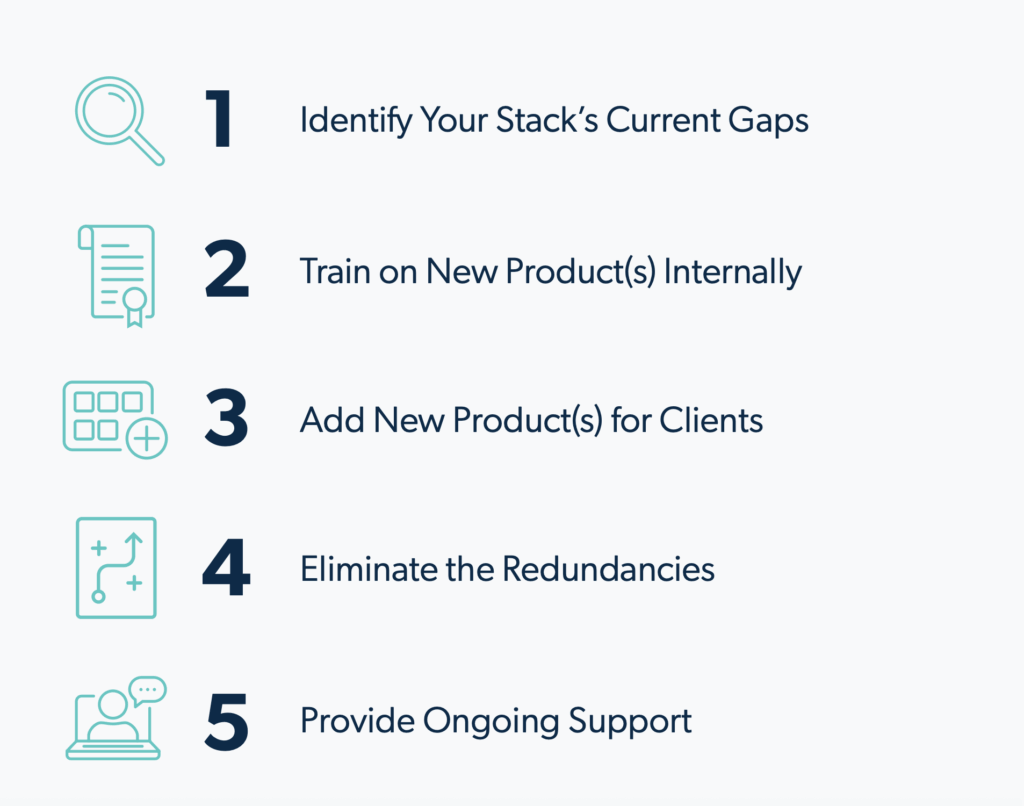
1. Identify Your Stack’s Current Gaps
Before you can begin IT centralization, you need to take stock of how it would help. Begin with an audit of your current tech offerings, and look for any gaps in coverage. This step is all about finding your weaknesses, and building a strategy to eliminate them.
Create a list of offerings you don’t have…or that you have, but don’t work as well as you want. You can also talk to your current clients to ensure there’s no technology they’d like to have but currently don’t.
Sort your list into:
– Wants: Capabilities that you’d use if you had them, but aren’t dealbreakers.
– Needs: Capabilities that you don’t currently offer that you must begin offering.
– Don’t needs: Any capabilities you currently offer but that aren’t necessary.
– Haves: Capabilities your current software already covers.
This will give you a clear idea of the main capabilities you’re looking to add or replace in your stack
Use your list to compare your existing and potential new platforms. Begin with multifunctional software that covers all your needs. Bonus points if it includes some of your wants, too.
Ultimately, selecting the platform (or platforms) that works best for your business and your clients will be a subjective and personal decision. Remember, however, that the goal of centralization is to minimize the overall number of vendors you work with. If your new software ends up tallying a similar amount of vendors as your current software, you may want to revisit the providers you chose.
2. Train on New Product(s) Internally
Ensure your MSP team is fully up-to-speed and confident working with the new products – before you ever introduce them to your clients. Consider beginning with a test group, where several MSP employees pilot the new software and offer feedback and potential roadblocks or questions they as faux-users encounter. This way, your team can be better prepared to serve your clients when they come with the same questions.
Use this group to engage the overall mood of the changes and to see in real-time how much (or little) the new software will affect the end-user experience.
Have your test group give their opinions on the usability of the new products, how much downtime clients should expect from the changes, and common questions that arose for them during the transition.
Compile the test group feedback into training materials and FAQs for your customer success teams who will be deployed to work closely with clients throughout the transition. Make sure they are proactively prepared to answer the most common issues that arose in the test group and that they themselves are fully confident of the software. Coming to the transition prepared will increase clients’ trust and confidence.
3. Add New Product(s) for Clients
Implement the new chosen software in phases so clients know what to expect. This gives them time to adapt to any changes they’ll see on their end. Staggering changes also ensures your support staff will be available to troubleshoot any issues, and that one platform is completely integrated before you introduce another.
This ensures you get their buy-in and compliance. For example, if you simply ask them to follow the prompts you’ll push to their device and log in, this may seem like a low priority task to them that they’ll push off.
If, however, you explain that that login is required in order to continue accessing company resources, they’ll be more compliant.
If the new software will give your clients and their employees any visual change to their experience, make sure you offer training on the changes. Once they’re onboarded, give them time to adjust to the differences before implementing any other changes.
Once a few weeks have passed, your clients should be set up with their new MFA, and most of the kinks should be worked out. This is when you’re ready to proceed with elimination.
4. Eliminate the Redundancies
Once your clients are comfortable enough with the new software that they’re naturally defaulting to using it, you can eliminate the old platforms. The legacy solutions will begin to feel inconvenient to use if clients have to revert to it for only a few functions, so grouping all functionalities under the new stack will feel like a relief.
Begin by strategically and surgically eliminating redundant tech, since very few if any employees should still be relying on it at this point. Once it’s gone and employees are fully onboarded to the new system, you can re-audit your stack and remove any other vendors who aren’t being utilized.
5. Provide Ongoing Support IT
Consolidation is a process, not an overnight change. To make it a positive experience for clients, make sure you offer additional support and troubleshooting during the entire transition. If you don’t already have one, consider assigning a dedicated customer success rep for the duration of the consolidation process. This gives your clients ongoing support and ensures quick response to any issues to make for a smooth and hassle-free transition.
Training and support content can go a long way to ensuring you can keep up with incoming (and likely repetitive) requests for help navigating new experiences. Since you almost certainly have access to a web meeting platform, making short tutorial videos has never been easier. Focus on developing 2-3 minutes clips that walk through new processes, and don’t worry about high production value; what’s more important is that your client will be able to self-serve the help they need and see the faces of your employees that much more.
Make sure you check-in with your customers regularly to give them an opportunity to air concerns or struggles. This intel can help you refine your consolidation process for other clients to develop it into the most worry-free change possible.
Properly handling centralization can improve your rapport with clients, further cementing your status as a trusted technological partner who has their best interests at heart.
Centralize Your Tech Stack with JumpCloud
It’s getting more and more difficult for MSPs to manage their clients’ IT environment in a way that is cost-effective, scalable, and secure. MSPs often need to rely on multiple third-party vendors and find a way to stitch these solutions together, while educating their own staff and their clients on how to use and support these tools. Additionally, gaining visibility into what is happening across the stack of solutions is a challenge and can lead to improper configurations and security vulnerabilities.
JumpCloud for MSPs™ is an open directory platform that empowers MSPs to centralize identity, access, and device management capabilities under one console. JumpCloud for MSPs can fill the gaps in a partner’s offering without having to rip and replace existing technologies in which they have already made investments. If a partner relies on an existing directory platform, RMM, PSA, or any other tool to help run their business and support their clients, JumpCloud fills gaps around that tool and offers a variety of integrations to make their experience secure and seamless.
If you are interested in learning more about implementing JumpCloud for MSPs as part of your IT centralization strategy, get in touch today; we’d love to chat about how you can use JumpCloud for MSPs. Or, you can try it for yourself by signing up for a free trial. Instantly gain access to a multi-tenant portal and understand how you can centralize your identity, access, and device management across your customers.